01
Plan early with a demand forecast.
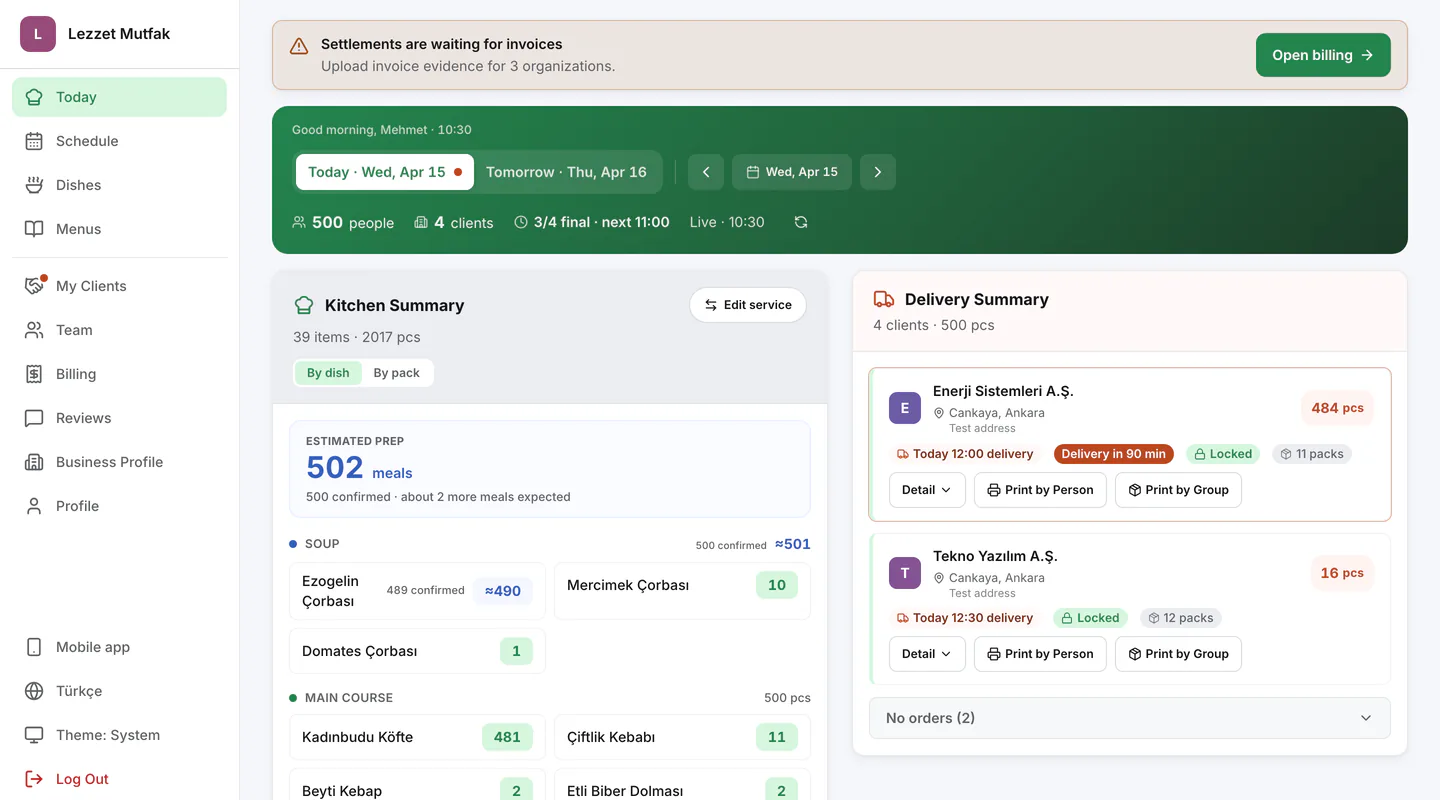
See an estimated preparation count calculated from past participation and selections received so far; the forecast updates as choices arrive.
For caterers serving companies and schools
Publish your menus and collect customer selections in one place. See how many of each dish to prepare for every customer, then manage delivery plans, feedback, invoices, and payouts from the same dashboard.
You can start with an existing customer.
From menu to feedback
Early visibility, exact production
The demand forecast evaluates past participation and selections received so far for each customer, giving the kitchen an early preparation view. Customers can change their choices until the deadline; the estimate then gives way to the confirmed order count.
See an estimated preparation count calculated from past participation and selections received so far; the forecast updates as choices arrive.
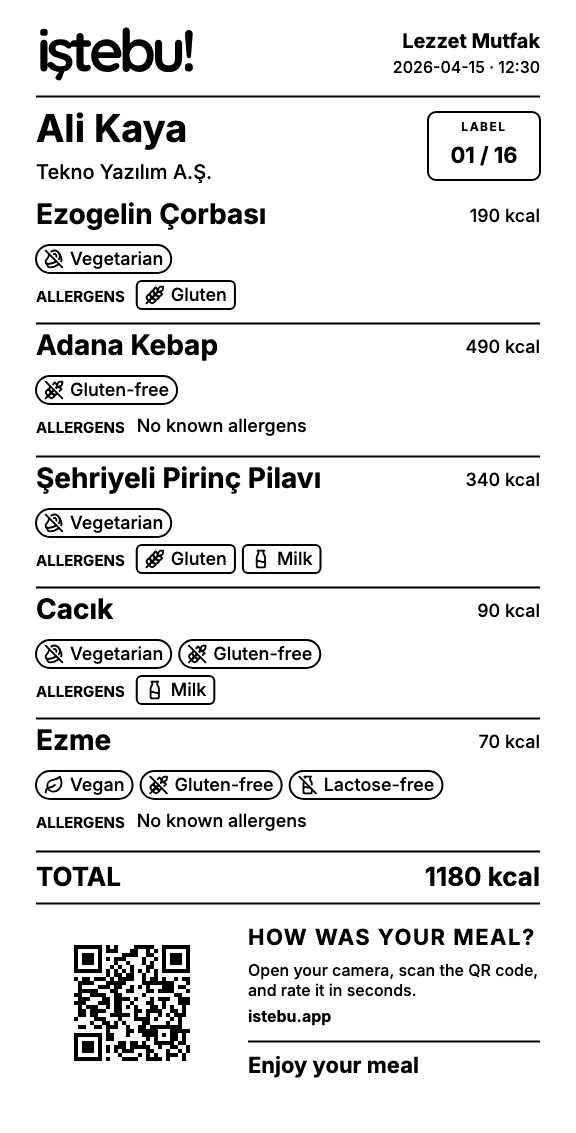
Prepare lists by address and time, then print name labels with a compatible printer.
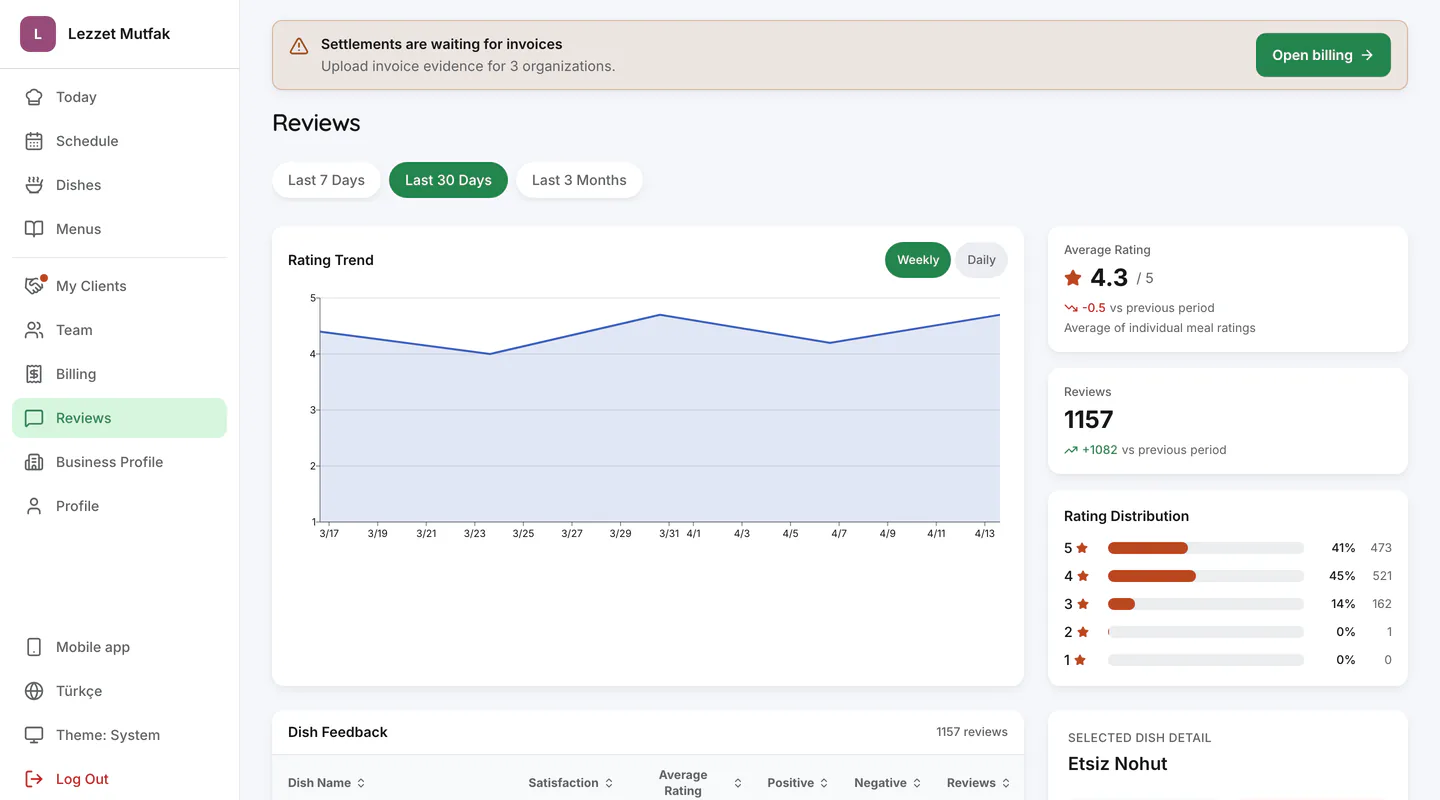
See the ratings, tags, and comments collected for every dish.
How it works
Production, packing, and delivery remain your operation; iştebu! yemek organizes the daily information flow among the customer, the person choosing, and the kitchen.
Set the menu, price, selection time, and delivery plan for each customer.
Customers choose after seeing the meal photo, allergens, dietary and special-content labels, and calorie information.
When selection closes, see how many containers of each dish to prepare for every customer.
Collected ratings, tags, and comments reach you directly and guide future menus.
See the product
See the core workflow in the real product, from today’s preparation and the weekly schedule to billing and dish-level feedback.
01
For every customer, see the delivery address and time, total meals, and confirmed counts by dish.
02
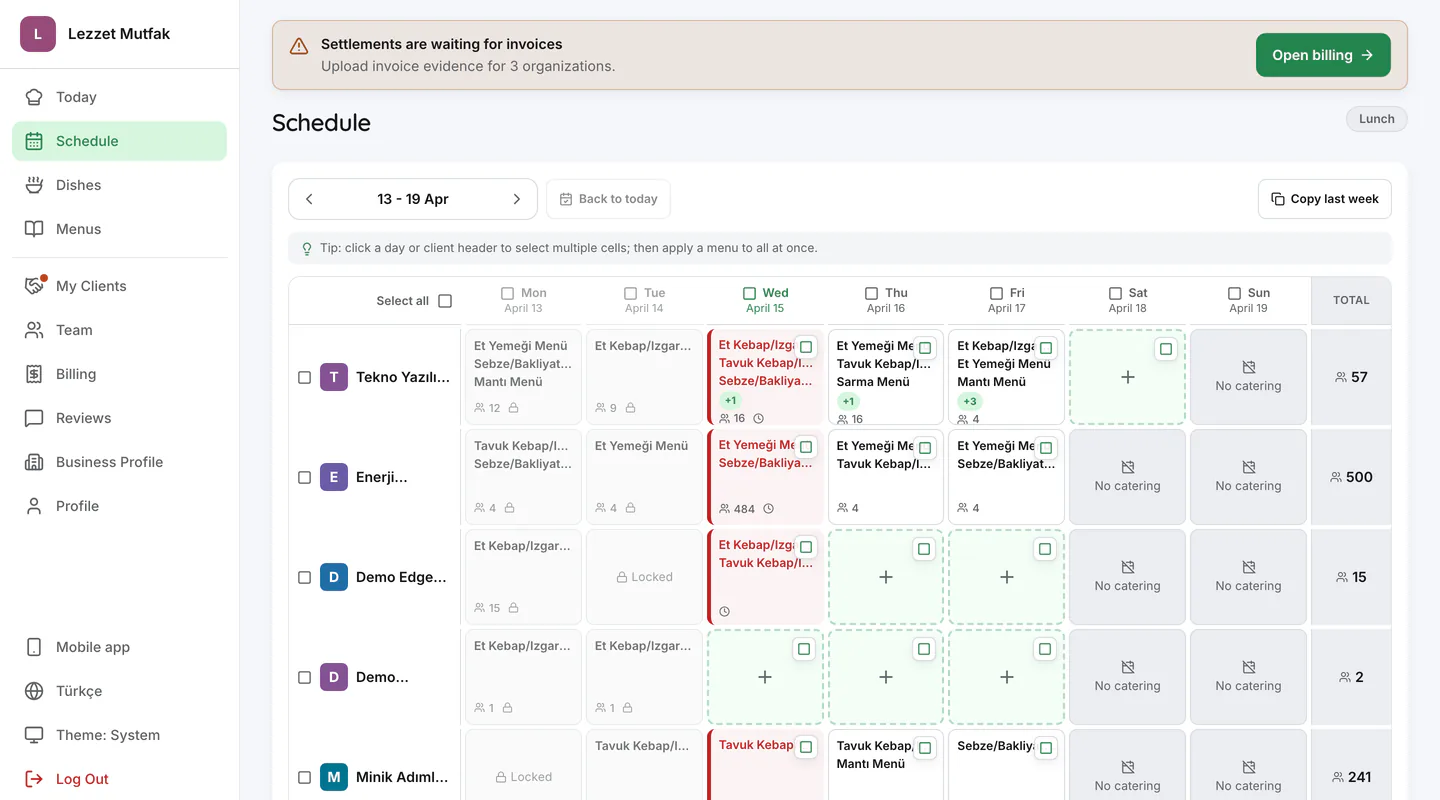
Follow which menu opens for each customer on each day, together with selection times and delivery plans.
03
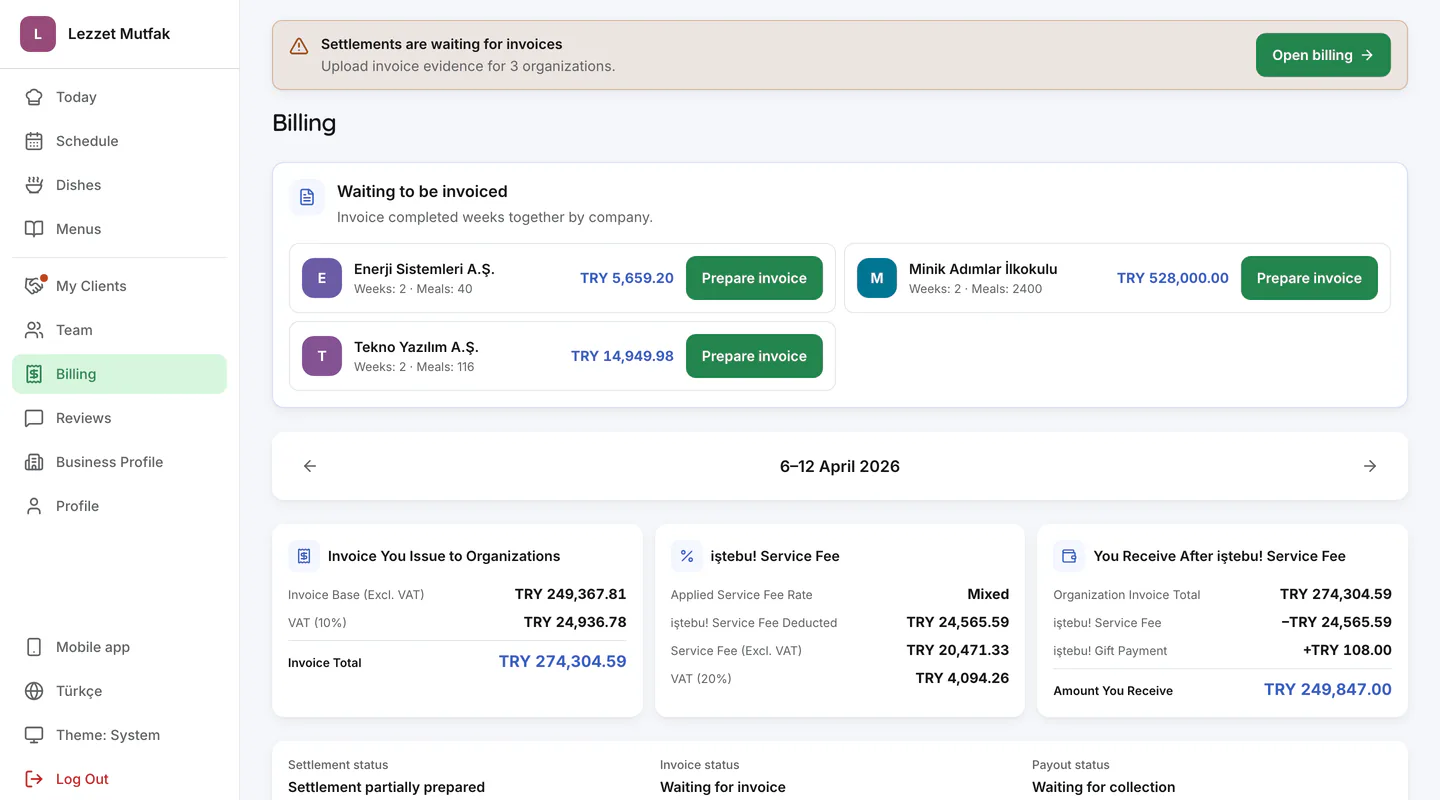
See meal counts and totals for completed weeks, record the invoice you issued, and follow each stage of the payment process.
04
See collected ratings, tags, and comments by dish, then use trends to identify meals that need attention.
Packing and labels
Confirmed choices generate person-level meal labels and packing lists. The label carries the name, organization, and selected dishes together with the allergen, dietary, special-content, and calorie information entered in the system; its QR code opens the rating screen.
Pack meals in microwave-ready containers, attach the label, and deliver them in insulated Thermobox carriers.
Marketplace + daily management
Add customers you already serve or evaluate requests from companies and schools in the marketplace. Once service begins, the daily workflow continues from menu to payout.
Start with one customer, then add new companies and schools to the same operating setup.
Existing customers
Set up menus, prices, selection times, and delivery plans with an existing company or school customer.
Marketplace
Organizations can review your verified profile and menus, then send a match request. The marketplace does not guarantee demand or revenue.
Daily management
Manage menus, selections, confirmed production counts, delivery plans, feedback, and billing.
Getting started
Start with a customer you already serve and build the menu and service plan around your real operation.
Share your company details, service area, and core verification documents for review.
Connect an existing company or school customer, or accept an incoming request.
Open selections once the menu, price, selection time, and delivery plan are set.
You can publish menus after the food business registration certificate and tax certificate are verified and service terms are set.
Answers on new customers, existing client onboarding, service fees, and daily operations.
Companies and schools can find your business in the marketplace and request your service. Demand or revenue is not guaranteed.
You continue to handle production, packing, and delivery. Menus and orders are managed in one place, with confirmed counts available after the selection deadline.
The service fee and payment terms are agreed in writing before you start. The fee and any adjustments are deducted from customer payments, and your remaining payout follows the agreed schedule.
Yes. You can connect using the invite code of a company or school you already serve. Our team can help you get started.
Yes. Track each customer's orders, deliveries, and accounts separately, while seeing total preparation needs in the kitchen view.
You need a tax certificate and a Food Business Registration Certificate. Our team checks them; the documents are not shared with customers.
For your catering business
Using your real menu, we will show how selection, demand forecasting, confirmed production counts, labels, and billing work for your business.